How to Ask a Free AI to Plan Your Whole Week of Meals From What’s Already in Your Pantry
Most people don’t have an empty pantry. They have a chaotic one. There’s half a bag of red lentils that’s been there since February, two tins of chickpeas, some pasta, a jar of something that might still be okay, and about four different half-used spice packets. And yet, three evenings a week, the same thought hits: there’s nothing to eat.
The problem isn’t a lack of food. It’s a lack of a system for turning what you have into actual meals. A free AI chatbot can be that system — if you know how to talk to it.
🤖 Quick Summary: AI Pantry Meal Planning
- What this is: A practical walkthrough for using a free AI chatbot to plan a full week of meals from ingredients you already own.
- Who it helps: Anyone who opens the fridge mid-week and has no idea what to cook — or buys more groceries than they actually need.
- Problem it solves: Reduces food waste, cuts impulse shopping, and eliminates the daily “what’s for dinner” stress.
- Main takeaway: How you describe your pantry to the AI determines everything — vague input gives vague results.
- What to do next: Open a free AI tool (ChatGPT, Gemini, or Copilot), try the prompt template in this article, and see what it generates from what you already have.
- Why it matters: The average UK household throws away £720 worth of food every year. A five-minute AI prompt can start reversing that this week.
What This Actually Does — and What It Doesn’t
Before getting into the how, it’s worth being straight about what you’re working with.
Free AI tools like ChatGPT (OpenAI), Gemini (Google), or Microsoft Copilot are large language models trained on an enormous amount of recipe, cooking, and nutritional information. When you describe what’s in your kitchen and ask for meal ideas, they can generate practical, coherent meal plans in seconds. You don’t need a paid subscription. You don’t need to be technical. You just need to know how to ask.
What AI won’t do: check whether your half-open jar of tahini has gone off, know that your child refuses anything with visible onion pieces, or understand that you only have twenty minutes on a Tuesday evening. It will give you what you ask for — so the quality of what you ask determines the quality of what you get.
This article covers exactly how to ask.
Step One: Do a Five-Minute Pantry Audit Before You Open the AI
This is the step most people skip, and it’s the reason their results feel generic.
If you walk up to a free AI and type “I have some pasta and a few tins, what can I make this week?” you’ll get a generic pasta plan that doesn’t reflect your actual kitchen. The AI is pattern-matching against average kitchens, not yours.
The fix is spending five minutes doing a genuine pantry scan before opening the tool. Go through three areas:
Front of shelf or top of fridge — things that need using soon. Soft vegetables, open packets, things past their best-before, leftovers, anything already cooked and sitting in a container.
Main cupboard staples — tins, dried pulses, pasta, rice, noodles, flour, oats, sauces, condiments. Note partial amounts — “about a third of a bag of green lentils” is more useful to the AI than just “lentils.”
Freezer — frozen vegetables, meat, fish, bread, any frozen leftovers. Many people forget the freezer exists when thinking about what to cook.
Write it all in your phone’s notes app. This list becomes your prompt input. Doing it once also makes the habit much faster every subsequent week — you’ll know roughly what you have and only need to check the things that change.
A quick note on expiry: if you have items close to their best-before date, note them separately. You’ll want to specifically ask the AI to use those first.
Step Two: Build a Prompt That Actually Works
Here’s the difference between a prompt that produces a vague, unhelpful meal plan and one that produces something genuinely useful.
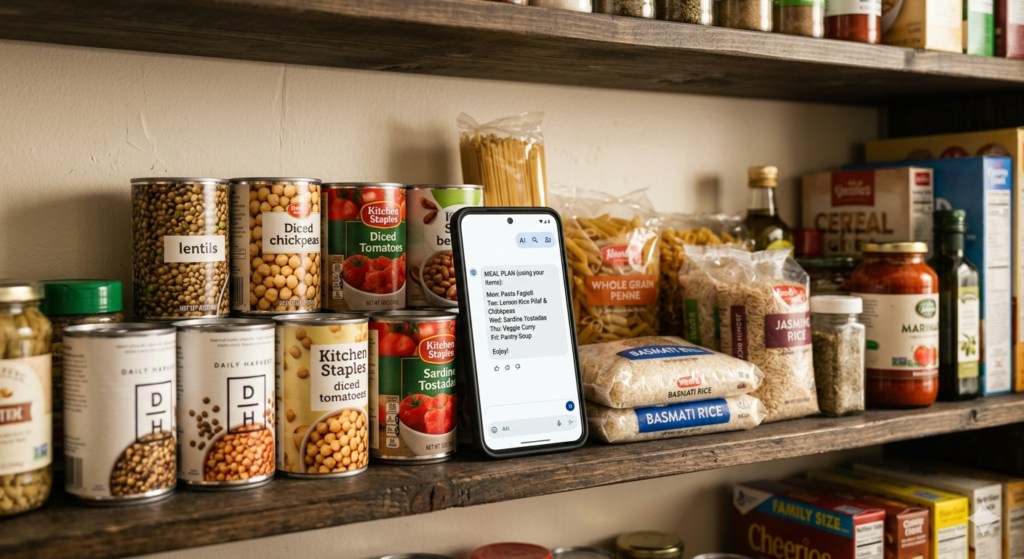
Weak prompt:
“I have pasta, tinned tomatoes, lentils, and some vegetables. Can you suggest some meals for the week?”
This will produce five generic pasta dishes. The AI has no context about your household, your time, your skills, or what combination of these ingredients makes sense.
Strong prompt:
“I need a 5-day weekday meal plan using ingredients I already have. Here is what’s in my kitchen: 1 tin of chickpeas, 1 tin of chopped tomatoes, 200g of red lentils, half a block of firm tofu, 3 soft carrots, 1 onion, 2 garlic cloves, dried pasta (about 300g), basmati rice (about half a bag), 1 teaspoon of cumin, smoked paprika, and soy sauce. I also have olive oil, salt, and pepper. There are 2 adults and 1 child aged 8 eating. Meals should take under 30 minutes to prepare and be simple — nothing that requires equipment beyond a hob and a basic oven. Please use ingredients that are close to being used up first and minimise what I’d need to buy to complete the plan.”
The second prompt tells the AI:
- Exactly what you have and in what quantities
- Who is eating and any relevant context (child-friendly)
- Time constraints
- Equipment limitations
- Which items to prioritise
- What the goal is (minimise new purchases)
The meal plan it returns will be dramatically more useful, more practical, and more directly tied to what you actually have.
The Prompt Template You Can Copy and Adapt
Here is a reusable template. Copy it into your notes app, fill in your own pantry items, and paste it into any free AI tool.
I need a 5-day weekday meal plan using ingredients I already have at home.

Here is what's in my kitchen:
[List every ingredient with approximate quantity]

My household: [Number of adults / children and ages]
Cooking time available: [E.g. 20 minutes on weeknights, more time on Friday]
Equipment: [Hob / oven / microwave / slow cooker — whatever you have]
Dietary preferences or restrictions: [E.g. no red meat, nut allergy, vegetarian, etc.]
Skill level: [Beginner / comfortable with basics / confident cook]

Please:
- Prioritise ingredients that are already open or close to their best-before date
- Keep meals simple and practical
- At the end, list the minimum I'd need to buy to complete this plan
The last line — asking for a minimum shopping list — is one of the most useful things you can do with this workflow. It turns the AI from a recipe tool into a grocery savings tool. You may find you need to buy almost nothing, or that completing all five meals requires only two or three inexpensive items.
Why the Way You Describe Your Pantry Changes Everything
The most common reason people try this once, feel underwhelmed, and never try again is that they gave the AI almost nothing to work with.
Think about it from the AI’s perspective (in a simplified sense): if you say “I have vegetables,” it doesn’t know whether that means a full refrigerator drawer of fresh produce or one slightly tired courgette. If you say “I have spices,” it doesn’t know if you mean a well-stocked spice rack or a single jar of mixed herbs.
Quantities matter. “A quarter bag of chickpea flour” is useful. “Some flour” is not. Specific quantities let the AI plan portions realistically and avoid suggesting a dish that requires more of an ingredient than you actually have.
The state of ingredients matters. “3 soft carrots that need using this week” tells the AI to prioritise those. “Carrots” on their own will not.
Combinations matter. Mentioning that you have both coconut milk and lentils opens up dhal as an option. Mentioning that you have soy sauce, tofu, and rice opens up stir-fry options. If you list ingredients in isolation rather than together, the AI is less likely to connect them into a single dish.
If AI meal planning has disappointed you before, try the detailed prompt approach once before writing it off. The difference is significant.
Where AI Handles Pantry Meals Badly — And How to Fix It
Free AI tools are genuinely useful for this kind of task, but they have predictable weaknesses that are worth knowing about.
Flavour combinations. AI knows what ingredients are commonly paired in recipes, but it sometimes suggests combinations that are technically valid but don’t taste good together. If a suggested meal sounds strange to you, trust your instincts. Add one line to your prompt: “Suggest flavour combinations that are simple, familiar, and family-friendly.”
Quantity assumptions. Even when you specify quantities, AI sometimes generates recipes that would use more of an ingredient than you mentioned. Check the suggested recipes against your actual supplies before committing to a plan.
Spice complexity. AI often defaults to recipes with long spice lists when simpler versions would work. If you want straightforward weeknight cooking, say so explicitly: “Keep seasoning simple — I want meals that use five ingredients or fewer per dish.”
Food that’s already been opened. AI cannot know how long something has been open in your fridge or cupboard. It won’t flag that your opened jar of passata from ten days ago should be used today or discarded. You need to apply that judgement yourself when reading the meal plan.
Nutritional balance. AI can make a plan look varied without it being nutritionally complete. If this matters to your household, add: “Please include a protein source in every meal and at least one vegetable.”
None of these weaknesses make the tool unusable — they just require you to read the output with a small amount of critical thought rather than following it blindly.
Cost-Saving Reality
The honest picture of what this saves varies significantly depending on your household and how well you currently manage food waste.
For a family that currently shops without a meal plan and makes two or three midweek top-up trips because they “don’t know what to make,” the savings can be substantial. Research from organisations like WRAP consistently shows that UK households waste roughly a third of the food they buy. If a free AI meal plan reduces that waste by half — a realistic outcome for households who do this consistently — the monthly saving can run to £30–£60 or more.
The more immediate saving is avoiding the specific purchases that happen when you’ve decided on a recipe but the pantry isn’t factored in. A meal plan built from what you already have eliminates those trips entirely.
The compounding effect matters. Doing this for one week saves a small amount. Doing it consistently for a month or two builds a clearer picture of which pantry staples your household actually uses, which you keep buying and never finishing, and how little you actually need to spend to eat well each week.
For broader grocery budget work, the same AI tools that generate meal plans can also help you build a structured weekly shopping list — something covered in more depth in how to use a free AI to build a weekly grocery list that never goes over budget.
How to Use AI to Reduce Your Midweek Shopping Trip — Not Just Plan Meals
The meal planning step is the starting point. The money-saving step comes immediately after it.
Once the AI has generated a five-day plan from your pantry, ask it a second question in the same conversation:
“Based on this meal plan, what is the absolute minimum I need to buy this week to complete every meal? List only items I don’t already have, in order of importance.”
This produces a short, targeted shopping list rather than a full weekly shop. For many households, completing a pantry-based meal plan requires buying only three to six fresh items — things like eggs, a bunch of fresh coriander, a bag of spinach, or a lemon.
Contrast this with the average weekly shop, which often includes items bought out of habit, items bought because they seemed useful, and items bought for recipes that never ended up being cooked.
The second question is what turns this from a recipe planning exercise into genuine grocery savings. Try it once and compare the resulting list to your typical weekly shop receipt.
Common Mistakes to Avoid
Giving the AI a vague ingredient list. As covered above, the quality of the output directly reflects the quality of the input. Specificity is everything.
Asking for a full seven-day plan when you don’t need one. A five-day weekday plan is usually more realistic and generates better results than asking for breakfast, lunch, and dinner for seven days. Start with dinners only if that’s where most of your decision fatigue sits.
Not mentioning who is eating. A meal plan for one person on a student budget is completely different from a plan for two adults and two children. Always include this context.
Following the AI plan without checking what you actually have. AI can misread quantities or suggest a dish that uses an ingredient you listed but already finished before you sat down to type. Cross-check the suggested plan against your physical pantry before you commit to it.
Expecting restaurant-quality recipes. The AI is helping you use up what you have efficiently. The results will be practical, family-friendly meals — not fine dining. Set expectations accordingly and the tool will feel genuinely useful rather than disappointing.
Treating it as a one-off thing. The habit compounds over time. One week of pantry planning saves a little. Four weeks of consistent pantry planning starts to change your shopping behaviour.
Myth vs Reality
Myth: You need a paid AI subscription to do this. Reality: ChatGPT’s free tier, Google Gemini’s free version, and Microsoft Copilot (completely free) all handle this task well. You don’t need ChatGPT Plus or any paid tool for straightforward meal planning from a pantry list.
Myth: AI will suggest complicated, impractical recipes. Reality: Only if you let it. Adding “keep meals simple and quick” to your prompt consistently produces practical weeknight cooking suggestions. The AI follows your instructions — it isn’t trying to impress you with complexity unless you ask for it.
Myth: This only works if you have a well-stocked pantry. Reality: It works especially well with a sparse or chaotic pantry, because the AI is better at connecting unusual combinations than most people are when staring blankly at their shelves at 6pm.
Myth: Meal planning with AI takes a long time. Reality: Once you have a saved prompt template on your phone, this process takes about five to eight minutes from pantry scan to completed meal plan. The time investment is genuinely small.
Myth: AI will come up with the same meals every week. Reality: If you give the AI the same input, it produces similar output. Change the prompt details — different ingredients, different constraints, a request to try a different cuisine style — and the results change accordingly.
Advanced Section: Running a Rolling Weekly Pantry System With AI
For readers who want to go beyond a single-week plan, the real payoff comes from treating this as a consistent weekly habit rather than an occasional exercise.
Give the AI context from the previous week. At the start of week two, add a line to your prompt: “I have leftovers from last week’s lentil soup (about two portions), half a block of the tofu from last week, and a cooked chicken breast. Factor these in before using fresh ingredients.” This prevents waste from crossing week-to-week and makes the planning more genuinely tailored.
Build and save your personal prompt template. Over the first month, you’ll refine what details produce the best results for your household. Once you’ve found a structure that works, save it as a note in your phone with placeholders for the weekly ingredient list. Each week’s session becomes faster and more accurate.
Let AI reveal your buying patterns. After three or four weeks, look back at your weekly top-up lists. You’ll start to see which ingredients you consistently run out of and which you keep buying and never finishing. Ask the AI directly: “Based on these four weeks of meal plans, what are the ten pantry items I should always keep stocked?” This is genuinely useful information that most households never think to gather.
Use AI to build a rotation staples list. A well-chosen set of eight to ten pantry staples — dried lentils, tinned tomatoes, rice, oats, olive oil, eggs, soy sauce, and a handful of spices — can underpin dozens of different meals. Ask the AI to suggest the staples that give your household the most flexibility for the fewest pounds of weekly spend. Then keep those items stocked and vary everything else by season and price.
Know when to stop needing it. The goal of using AI for this is to build a system, not a dependency. After a few months of consistent use, many households find they’ve naturally internalised a better relationship with their pantry and food waste has dropped noticeably. At that point, the AI becomes occasional rather than weekly — and that’s exactly what good outcomes look like.
This kind of systematic approach to household food planning pairs naturally with the broader food waste strategies covered in how to regrow celery, leeks, and lettuce from kitchen scraps, and with the seed-saving habits in how to harvest and propagate seeds from grocery store vegetables — both of which extend the same “use everything, waste nothing” principle beyond the pantry.
FAQ
Q: Which free AI tool is best for pantry meal planning? A: All three major free tools — ChatGPT (free tier), Google Gemini, and Microsoft Copilot — handle this task competently. ChatGPT tends to produce more structured, easy-to-follow plans. Gemini integrates well if you already use Google products. Copilot is completely free with no usage limits through a Microsoft account. Try the same prompt in two of them and compare — it takes less than five minutes and you’ll quickly develop a preference.
Q: What if I don’t have many ingredients — will it still work? A: Yes. AI meal planning is arguably most useful when your pantry is sparse, because connecting a small number of ingredients into varied meals is exactly the kind of pattern-matching that AI does well. Even with six or seven staple items, a free AI can usually generate three to five distinct meal ideas. Be specific about what you have and ask it to work with what’s there rather than suggesting additions.
Q: Can I ask the AI to account for dietary restrictions? A: Absolutely — and you should. Include dietary restrictions, allergies, and preferences clearly in your prompt. “No nuts,” “vegetarian only,” “low salt due to a health condition,” “one person doesn’t eat fish” — all of these can be specified and the AI will respect them. Always double-check the output yourself if the restriction is a genuine allergy rather than a preference.
Q: How do I save the meal plan so I can refer back to it during the week? A: Copy and paste the AI’s response into a notes app, a Google Doc, or your phone’s reminders. Some people take a screenshot. There’s no built-in save function in most free AI tools — the conversation disappears if you close it or start a new one, so copying the output before you close the window is a good habit.
Q: Is it safe to share a full list of what’s in my home with an AI tool? A: Sharing a list of food ingredients carries no meaningful privacy risk. The information is not sensitive in the same way as financial or personal data. However, it’s sensible general practice not to share your full address, full name, or any personal identifiers in the same conversation. A list of “200g lentils, 1 tin tomatoes, 3 carrots” is entirely safe to share with any of the free tools mentioned.
Conclusion
The weekly “what do we eat this week” problem is one of those low-level household stresses that costs both time and money without anyone quite noticing. Buying duplicate ingredients, making unplanned top-up trips, and watching food go off because there was no plan to use it — these small things add up over a year into real spending.
A free AI meal planner built from your actual pantry doesn’t require any expertise, any cost, or any significant time. It requires a five-minute inventory, a well-written prompt, and the habit of doing it once a week.
For anyone already using AI tools for other household savings tasks — like the subscription audit approach covered here or using AI to generate an energy-saving morning routine from your utility bill — pantry meal planning is one of the most practical, immediately actionable additions to that toolkit.
Start with one week. Use the prompt template. Compare the result to how you normally decide what to cook. Then decide whether it’s worth making a habit.
Written by Sharjeel — Founder, informix.today
Last Updated: May 2026
Disclaimer: This article is for informational purposes only and does not constitute professional financial or legal advice. Always test DIY hacks safely.